Free & MIT licensed
Pack It Up and Take It With You
Archive exports everything on a Craft site — content, assets, relations and the content model itself — into one portable ZIP bundle. Nothing inside it needs Craft to read.
Craft CMS 5.3+ · PHP 8.2+ · No runtime dependencies beyond Craft

What You Get
A ZIP with a manifest, one master data file, and the asset files themselves. Plain text all the way down.
Inside the bundle
my-site-2026-07-26-140233.zip
├── manifest.json       what this is, and what's in it
├── README.txt          the same thing, in plain language
├── data/
│   └── archive.json    meta + schema + every record
└── assets/
    └── images/
        ├── hero.jpg
        └── team/portrait.jpg
One record, from data/archive.json
{
  "uid": "3f2b9a1c-…",
  "type": "entry",
  "site": "default",
  "title": "Hello world",
  "uri": "news/hello-world",
  "container": {
    "section": "news",
    "entryType": "article"
  },
  "fields": {
    "body": {
      "kind": "richText",
      "type": "craft\ckeditor\Field",
      "value": "<p>…</p>"
    },
    "featured": {
      "kind": "boolean",
      "value": true
    }
  }
}
Every field value says what kind of thing it is in Archive’s own vocabulary — richText, relation, blocks, money — so an importer switches on one stable set of names instead of on Craft field classes.
The Export Screen, For Real
Two screens from a Craft 5 control panel running Archive: pick what goes in the bundle, then find every bundle you have produced.
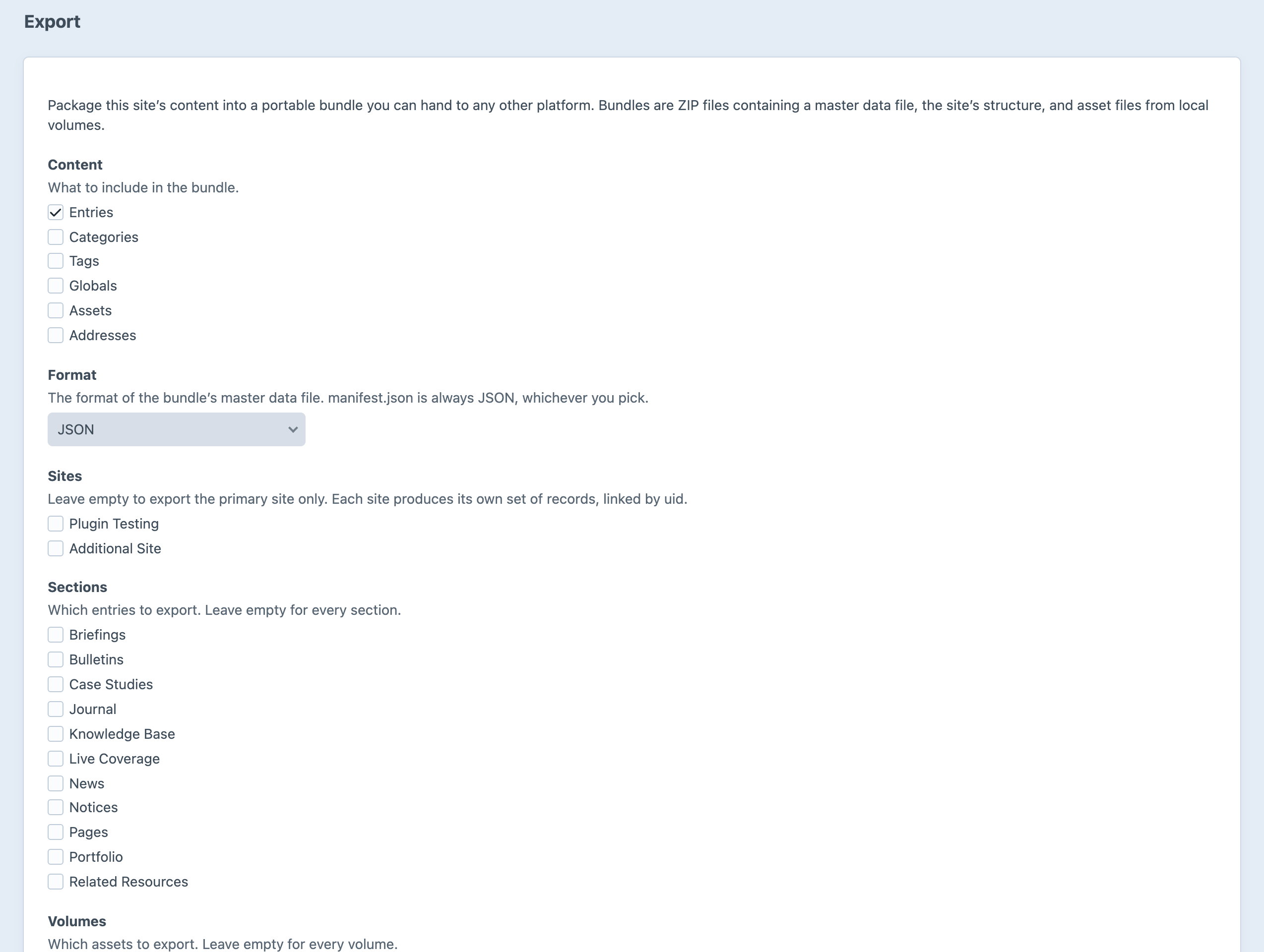
Choose the content, the format and the scope. Nothing is written until you export.
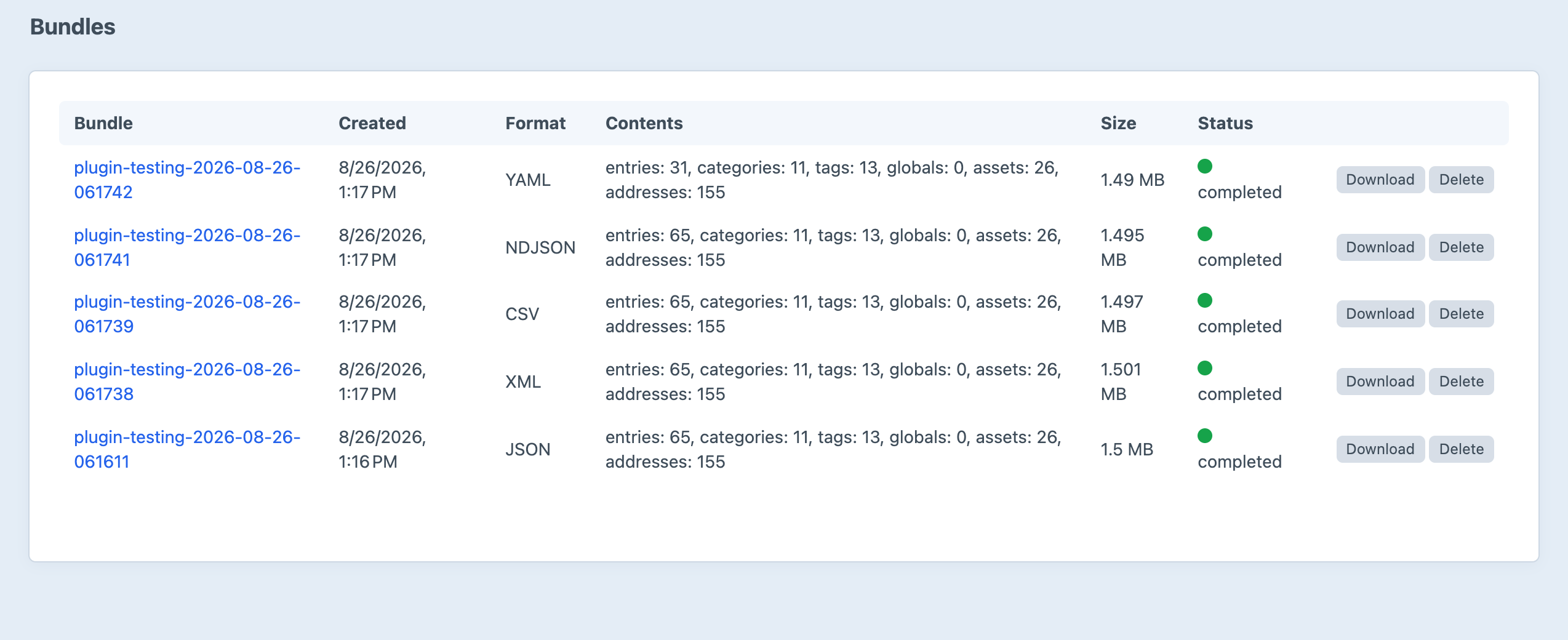
Every bundle you have produced, with its record counts and a download link.
Screenshots from a live install, not mockups.
Five Formats, One Schema
Pick the one the receiving system already reads. They all carry the same information — each in its own idiom.
JSON
data/archive.jsonThe canonical, lossless master file. One document holding the metadata, the site’s structure and every record.
The default, and what every other writer is measured against.
NDJSON
data/archive.ndjsonOne self-describing JSON object per line — a meta line, a schema line, then a line per record.
Huge sites, and importers that want to stream rather than parse a whole document.
XML
data/archive.xmlA DOM-built document. Illegal XML names become <item key>, nulls are nil="true", and anything with markup or newlines is wrapped in CDATA.
Systems that speak XML, and rich text that has to survive intact.
YAML
data/archive.yamlThe JSON document, in YAML. Structurally identical — the same keys, the same nesting.
Reading, diffing or hand-editing the model before an import.
CSV
data/csv/*.csvOne file per record type, a relations.csv join table, and the schema in its own directory. Nested keys flatten to dotted columns; what won’t flatten is JSON-encoded into its cell.
Spreadsheets, and importers that only accept flat tables.
Or your own
Writers are registered by event. Add a target-specific one — WordPress WXR, a bespoke importer’s format — and it appears in the format dropdown alongside the built-ins.
How to add one
manifest.json is always JSON, whichever format you pick — so a reader can always work out what it’s holding.
Features
Everything a site is made of, in a shape another platform can actually use.
Every Element Type
Entries, categories, tags, global sets, assets and addresses — and users, if you allow them. Each is a checkbox on the export screen, and filters narrow entries down to particular sections and assets down to particular volumes.
The Content Model Travels Too
Sites, sections, entry types, field definitions, category and tag groups, volumes, global sets, user groups with their permissions, routes and the installed plugin list all ride along under schema. The structure arrives with the content, so whoever is rebuilding the site knows what the shape was.
Field Values Anyone Can Read
Each field value carries a kind from Archive’s own vocabulary — text, richText, number, boolean, date, option, relation, blocks, table, link, color, money — alongside the originating Craft field class. Importers switch on the kind, which is stable, rather than on whichever plugin produced the field.
Rich Text Without Craft Tokens
CKEditor and Redactor values are exported with reference tags already resolved, so {asset:14:url} arrives as a real URL rather than a token only Craft can expand. Matrix blocks nest as ordinary data, recursively, with their own field values inside.
Assets, Bundled or Referenced
Files on local volumes are copied into the ZIP byte for byte and deduplicated. Files on S3, Spaces or Google Cloud Storage are referenced by URL instead, so a site with tens of gigabytes of cloud media still produces a bundle you can email. Every reference says which it is.
Translations Stay Linkable
A record is one element in one site. Records for the same element share a uid and differ by site — which is how translations survive a move to a platform with no concept of Craft’s multi-site element model.
Personal Data Stays Behind
A bundle is a downloadable ZIP, so user accounts are excluded until you explicitly allow them — they don’t even appear as an option until you do, and addresses owned by a user account are held back under the same rule. Password hashes are never exported, whatever the setting says. Filesystem settings are never exported either: that’s where cloud credentials live.
Built for Big Sites
Exports stream. Records are spooled to disk as they’re collected and written back one at a time, so memory stays flat however large the site is. There’s a run in the background option for exports that would otherwise outlast a web request, and --queue on the console command.
Console Commands and Cron
Run an export from the command line with the same options the form offers, list bundles, delete one, or prune them against the retention settings. Schedule it and you have a rolling, platform-neutral snapshot of the site without touching the control panel.
Honest About What It Can’t Do
Hyper, FreeLink, Google Maps and SEOMatic fields have serializers of their own. Anything else falls back to raw via the field’s own serializer — the value still travels, it just arrives as opaque data. Whatever was skipped or approximated is listed in the manifest’s warnings, and an empty warnings array means the export really was complete.
Frequently Asked Questions
Common questions about Archive.
Nothing. Archive is free and MIT-licensed — no license fee, no renewal, no paid edition. If it saves you a migration, that’s the whole point of it.
No, and that’s deliberate. Archive is one-way: it exists to get content out of Craft in a shape another platform can read. If you want to move content between Craft environments — with dependency resolution, conflict review and rollback — that’s Transport, a different plugin built for that job.
Not in the box. Archive writes a generic, well-documented schema rather than chasing one target platform’s import format, because a format that’s right for WordPress is wrong for Shopify, Contentful and the custom Rails app. The writer registry is open, though — a WXR writer is about a hundred lines, and once registered it shows up in the format dropdown like any built-in.
A ZIP containing manifest.json, a plain-language README.txt, one master data file under data/ in the format you picked, and asset files under assets/<volume>/<folder>/. The site’s structure lives inside the data file under schema. See the format spec for the full layout.
No. Filesystems are described by name and type only — their settings, which is where an S3 or Spaces filesystem keeps its access key and secret, are never exported. A bundle is a file people email each other, and it’s built on that assumption throughout.
Users are excluded entirely unless you switch Allow user export on in the settings — until you do, they don’t even appear as an option on the export screen, and addresses belonging to a user account are held back too. Addresses owned by something else, like an address field on an entry, travel as ordinary content. Password hashes are never exported under any setting.
Yes. Records are spooled to disk as they’re collected and written back one at a time, so memory stays flat regardless of size. For anything that might outlast a web request, turn on Run in the background on the export form, or pass --queue to the console command.
Files on local volumes are copied into the ZIP byte for byte and deduplicated, so two entries pointing at the same image produce one file. Files on remote filesystems are referenced by URL rather than downloaded, to keep bundles small — you can override that per export if you do want the bytes, and there’s a size limit above which a file is referenced instead of copied. Every reference carries bundled: true or false so a reader always knows which.
Archive ships serializers for Hyper, FreeLink, Google Maps and SEOMatic, each inert unless that plugin is installed. Anything else falls back to kind: "raw", serialized through the field’s own serializeValue() — the value still travels; its shape is just the originating plugin’s business rather than something Archive can describe. You can teach Archive a field type with a serializer of your own.
Yes. A record is one element in one site: records for the same element share a uid and differ by site, so translations stay linkable without nesting. Users and addresses have no per-site content in Craft, so their records carry no site keys at all. Pick the sites you want on the export form, or leave it empty for the primary site only.
Craft CMS 5.3 or later and PHP 8.2 or later, with the zip, dom and json extensions — all of which a Craft install already has. There are no runtime dependencies beyond Craft itself.
Under @storage/archive/bundles by default, which you can point anywhere in the settings. Retention is applied by age and by count — 30 days and 20 bundles out of the box — and php craft archive/bundles/prune applies it on demand.
Your content, in a box you can carry
Build a bundle in a minute and see exactly what comes out.
Free, MIT-licensed · Craft 5.3+ · PHP 8.2+